
Productivity Tips for Work From Home Beginners
Simple systems for better focus, fewer distractions, a cleaner daily routine, and healthier work-life boundaries when your home becomes your office.
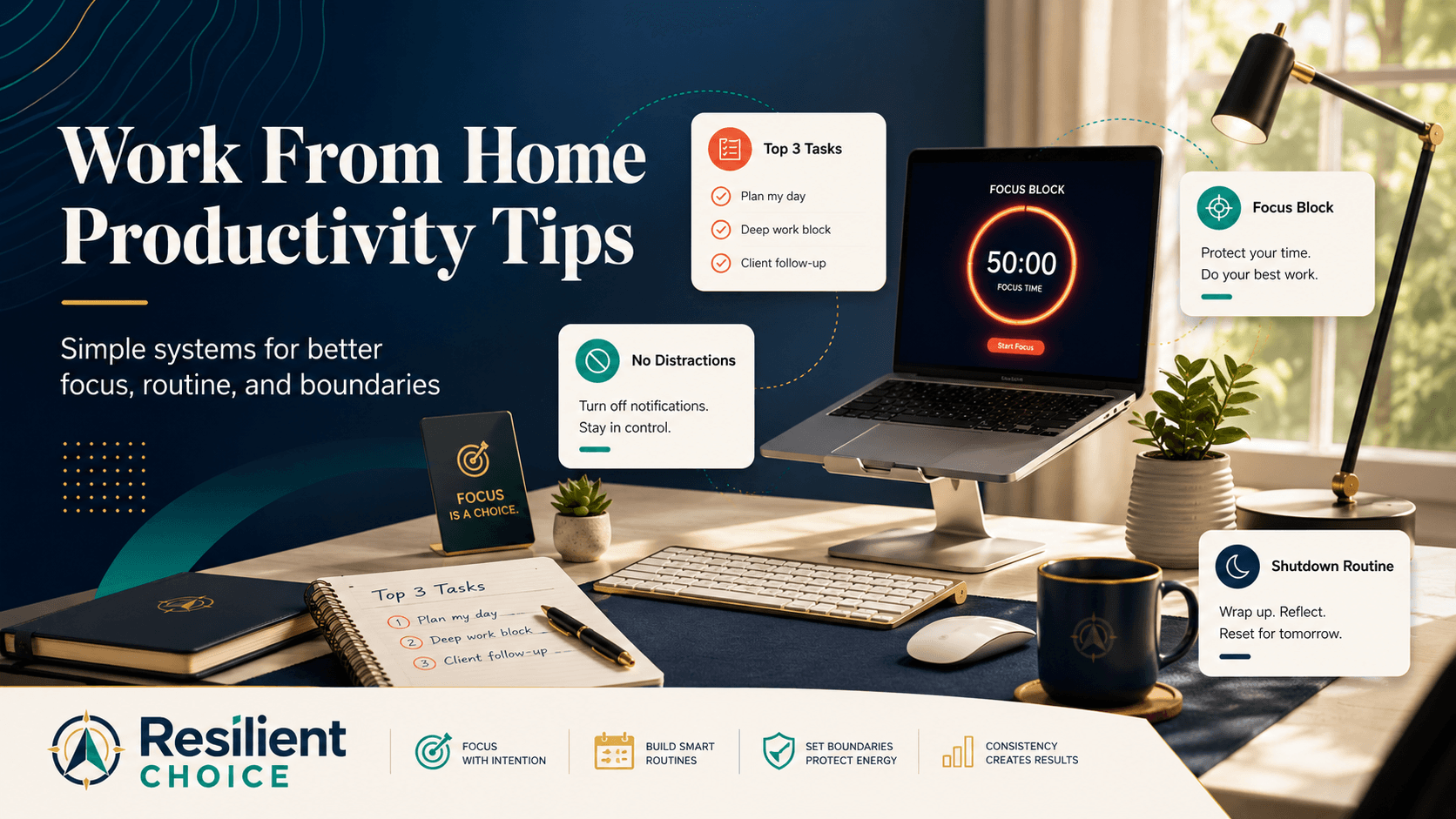
Productivity tips for work from home beginners should not make you feel guilty or lazy. Most people do not struggle at home because they lack discipline. They struggle because the workday has lost its natural shape.
In an office, the day gives you clear signals. You travel to work, sit at a desk, attend meetings, take a lunch break, and leave at the end of the day. At home, those signals disappear. Your laptop is near your bed. Your phone is always beside you. Email can follow you into the evening. Even simple household tasks can keep pulling your attention away.
That is why working from home needs a simple system. Not a complicated dashboard. Not ten productivity apps. Just a clear routine, a better work zone, fewer distractions, and a real shutdown habit at the end of the day.
Start here: If you only do three things today, choose your top 3 tasks, protect one focus block, and create a shutdown routine before the evening. Those three changes can immediately make your workday feel less scattered.
Why Productivity Tips for Work From Home Beginners Start With Structure
Many beginners assume remote work should automatically feel easier. No commute, fewer office interruptions, more flexibility. But that same flexibility can quickly become a problem when your day has no clear shape.
At home, work and life can blend into one long open loop. You may start by checking messages in bed, jump between tasks all day, answer emails during dinner, and still feel like nothing important was finished.
Your home was not designed like an office
At home, your attention gets pulled in small ways all day. The bed is nearby. The kitchen is nearby. A family member may ask one quick question. Your phone keeps lighting up. None of these things feel big, but together they quietly break your focus.
That does not mean your home is a bad place to work. It only means you need small signals that tell your brain, “Now I am working,” and later, “Work is finished.”
Beginner warning: Sitting online all day is not the same as being productive. The real goal is to finish meaningful work with clear attention, then log off without feeling guilty.
The hidden trap: work that never really ends
One common remote-work problem is that work does not fully replace office hours — it stretches into personal time. That may look harmless at first. One late reply. One quick evening check. One small weekend update. But over time, it can make home feel like a place where work is always waiting.
Cornell ILR School research highlights the difference between bounded work-from-home and work that extends into off-hours. The practical lesson is simple: if work has no ending, your brain never gets a clean break.
Build a Simple Work-From-Home Routine First
A strong daily routine for work from home does not need to be complicated. It only needs a clear start, a clear plan, focused work blocks, planned communication windows, and a clear ending.
Use a 10–15 minute virtual commute
A virtual commute is a short routine that helps you shift from home mode into work mode. It does not have to be complicated. You can walk for ten minutes, stretch, make coffee, review your calendar, or write your top three tasks before opening messages.
The point is not the activity itself. The point is repetition. When you do the same small routine every morning, your brain starts treating it like the start of the workday.
Harvard Business School Working Knowledge has also discussed how commuting can help people mentally shift between home and work roles. Remote workers can recreate part of that transition with a short, intentional routine.
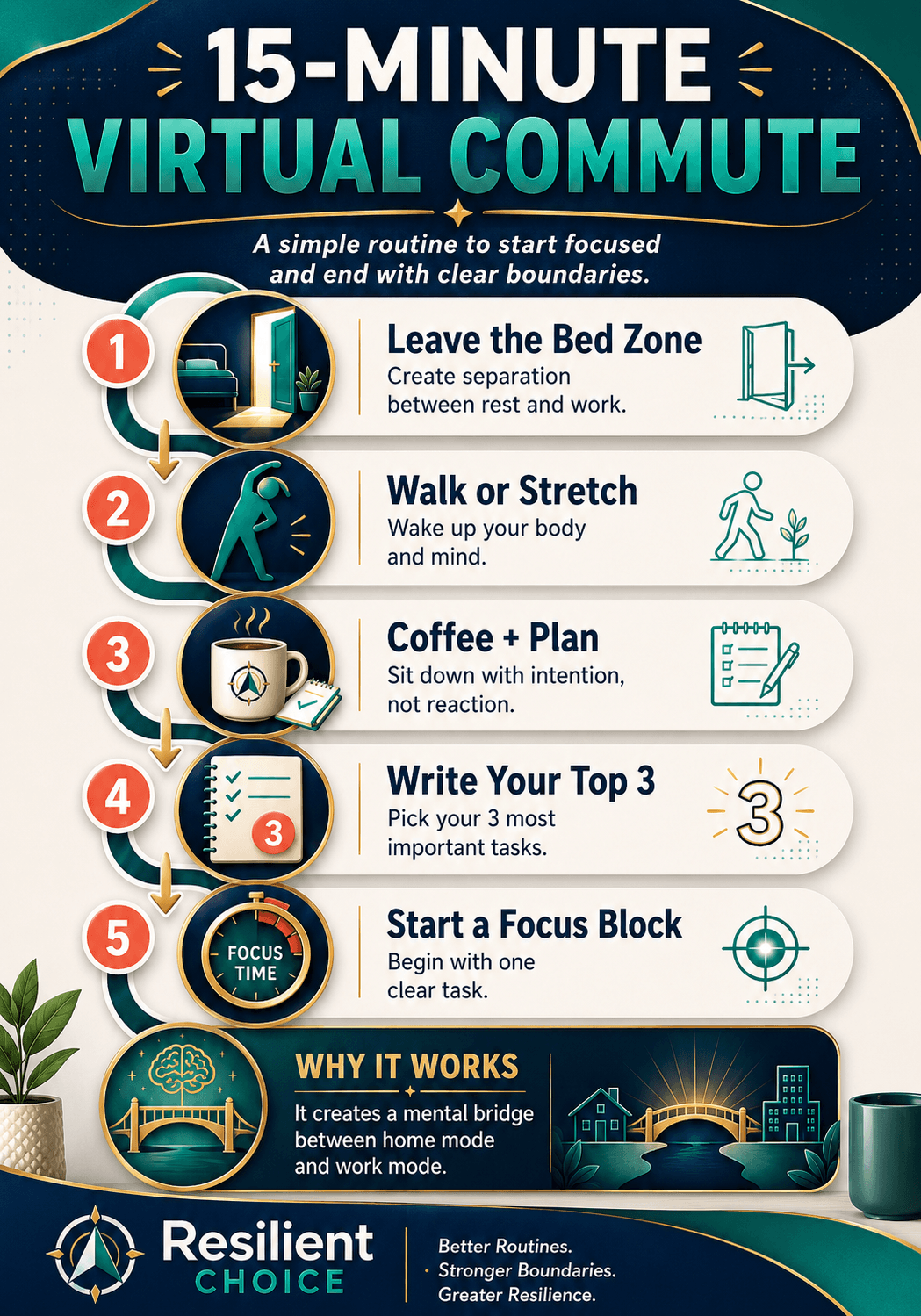
A simple morning startup routine
Try this routine before opening email or chat:
- Step away from bed and sit in your work zone.
- Check your calendar, not your inbox.
- Write your top 3 priorities for the day.
- Choose the first task that deserves focused attention.
- Start one focus block before reacting to random messages.
This routine prevents your morning from being controlled by other people’s requests.
A simple evening shutdown routine
Your shutdown routine is just as important as your startup routine. It tells your brain that the workday is complete.
- Review what you finished today.
- Write tomorrow’s top 3 tasks.
- Close unnecessary tabs and apps.
- Shut the laptop or cover your workspace.
- Step away for a walk, meal, hobby, or family time.
Pick 3 Priority Tasks Instead of Creating a Huge To-Do List
A giant to-do list feels productive when you write it, but it often creates task paralysis. Beginners need fewer priorities, not more pressure.
Use the Rule of 3
The Rule of 3 is simple: choose three meaningful outcomes for the day. These are not random tasks. They are the results that would make the day feel successful.
For example, “work on report” is vague. “Finish the first draft of the report” is clearer. “Check emails” is endless. “Reply to urgent client emails” gives the task a boundary.
Daily wins
Choose three outcomes that matter today. Keep them visible on paper or in your task app.
Weekly wins
Choose three results that would make the week meaningful. Use them to guide daily planning.
Monthly direction
Connect your weekly wins to bigger projects so your work does not become random busywork.
Turn vague tasks into clear outcomes
| Weak task | Better outcome | Why it works |
|---|---|---|
| Work on report | Finish the first draft of the report | It has a clear stopping point. |
| Check emails | Reply to urgent client emails | It avoids endless inbox scrolling. |
| Do marketing | Schedule three social posts | It turns a broad idea into a measurable action. |
| Organize workspace | Clear desk and prepare tomorrow’s notebook | It supports the next workday directly. |
Choose the Right Productivity System for Your Problem
There is no single best system for everyone. The best simple productivity system for beginners depends on the problem you are facing today.
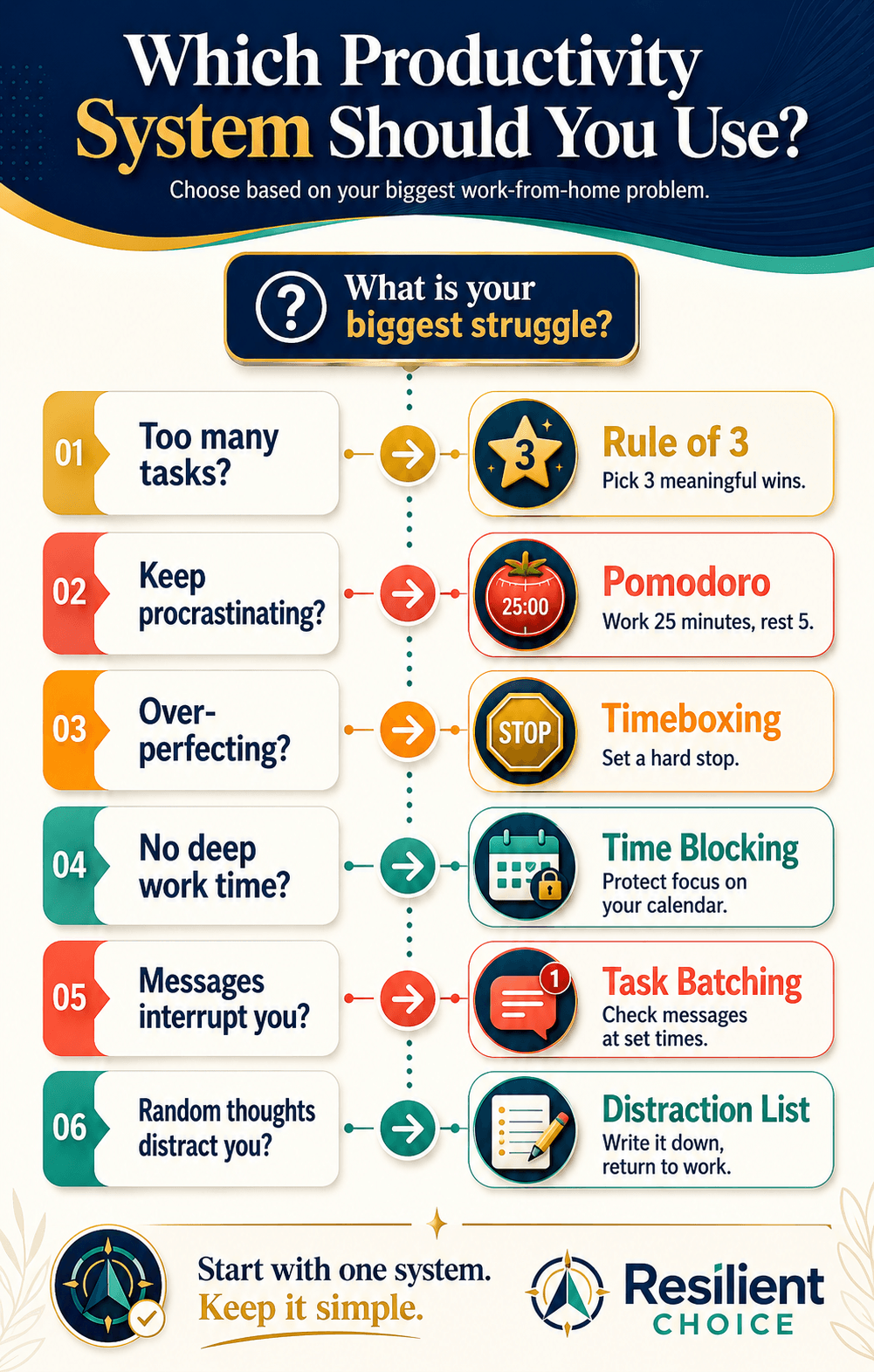
Use Pomodoro when starting feels hard
The Pomodoro Technique uses focused work sessions, commonly 25 minutes, followed by short breaks. For beginners, this works well because the commitment feels small. You are not promising to work perfectly all day. You are only promising to start one focused session.
Use it for tasks you keep avoiding: writing the first draft, cleaning up notes, starting a report, or organizing a messy inbox. Once you begin, the task usually feels less intimidating.
Use time blocking when important work keeps getting pushed back
Time blocking means assigning a specific task to a specific time on your calendar. Instead of hoping you will “find time,” you protect time before the day fills up.
Example:
- 9:00–10:30 — deep work on main project
- 10:30–10:45 — break
- 10:45–11:15 — email batch
- 11:15–12:30 — client task or project work
Use timeboxing when one task expands forever
Timeboxing means setting a hard time limit. It is useful for perfectionism, overthinking, editing, designing, researching, or planning.
Example: “I will spend 45 minutes creating the outline, then I will stop and move to the next step.”
Use task batching when messages interrupt your whole day
Task batching groups similar tasks together. Instead of checking email every 10 minutes, you create fixed communication windows. This reduces context switching and protects deep work.
| If this is your problem | Use this system | Simple action today |
|---|---|---|
| I keep procrastinating | Pomodoro | Set a 25-minute timer and start one task. |
| I over-perfect everything | Timeboxing | Set a strict 45-minute limit. |
| I never protect deep work | Time blocking | Put one 90-minute focus block on your calendar. |
| Messages interrupt me all day | Task batching | Check messages at two or three planned times. |
| Everything feels urgent | Eisenhower Matrix | Separate urgent work from important work. |
Control Digital Distractions Before They Control Your Day
One of the most important work from home productivity tips is also one of the simplest: reduce the number of things allowed to interrupt you.
Use the one-tab rule
When doing focused work, keep one main task window open. Close extra tabs, silence non-essential notifications, and avoid opening email unless email is the task.
This is not about being strict forever. It is about protecting one block of attention at a time.
Try a 20-minute timeboxed triage
Many beginners open email to “quickly check” something and lose 45 minutes. Instead, use a 20-minute triage block.
- Scan messages.
- Reply only to truly urgent items.
- Move non-urgent tasks to a list.
- Schedule anything that requires real work.
- Close the inbox when the timer ends.
Keep a physical distraction list
Place a notebook beside your keyboard. When a random thought appears — “pay bill,” “check order,” “wash dishes,” “reply to friend” — write it down and return to work.
This gives your brain permission to stop holding the thought without forcing you to act on it immediately.
Use AI tools only after the system is clear
Digital tools can help, but they should support your system, not replace it. Once your routine is clear, simple AI tools can help you summarize notes, draft emails, plan content, or organize repetitive tasks.
For a beginner-friendly tool stack, read our guide on best AI tools for online business beginners. Start small, then add automation later only when the manual workflow is working.
Set Up a Home Office That Supports Focus
Your work-from-home setup does not need to look expensive. But it should help your body and mind understand that this is a work zone.
Avoid the bed and couch trap
Working from bed can weaken the boundary between sleep and work. Working from a couch often pushes the laptop too low, causing your head and shoulders to collapse forward. A dining table can also be too high or too low for long laptop sessions.
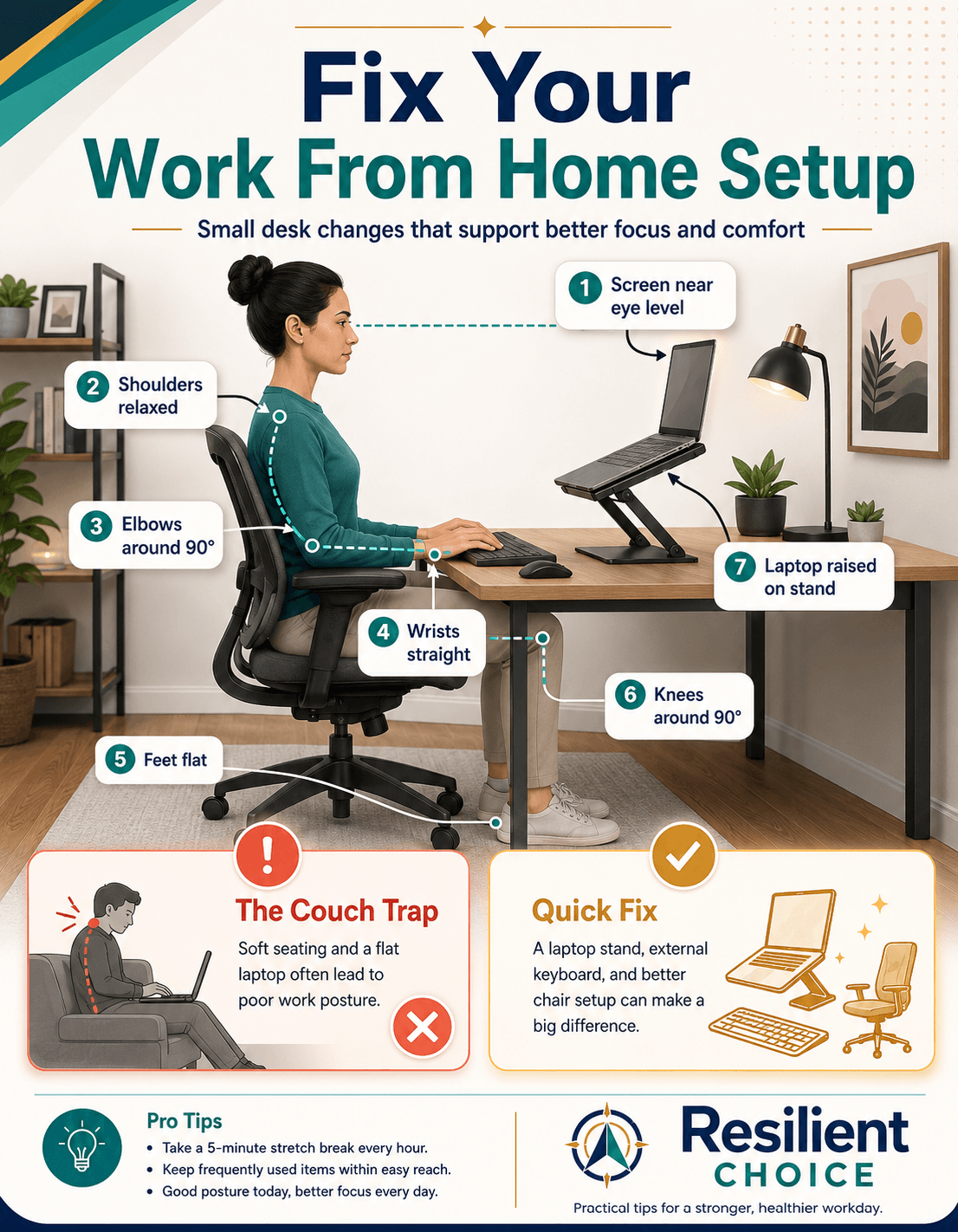
Use this quick ergonomic checklist
You do not need an expensive office. Start with the basics: feet supported, shoulders relaxed, wrists straight, screen raised, and laptop not sitting flat on the table for long sessions.
- Feet flat on the floor or on a stable footrest.
- Knees around hip level, not sharply bent upward.
- Shoulders relaxed, not lifted toward your ears.
- Elbows close to the body and around 90 degrees.
- Wrists straight while typing or using the mouse.
- Top of screen near eye level.
- Laptop raised on a stand with external keyboard and mouse if possible.
Small-space tip: You do not need a separate home office. A bedroom corner, foldable desk, storage bench, rolling cart, or small table can work if it creates a repeatable work zone.
Set Work-Life Boundaries Without Feeling Guilty
Beginners often feel guilty for logging off because work is still physically nearby. But remote work productivity improves when your workday has a real ending.
Use clear start and stop signals
Your start signal might be coffee plus your top 3 list. Your stop signal might be closing your laptop and writing tomorrow’s first task.
These signals may seem small, but repeated daily cues make your routine easier to follow.
Communicate boundaries clearly
Use simple scripts with family, roommates, or team members:
Example: “I’m doing a focus block from 9:30 to 11:00. I’ll be available after that.”
For team communication, try:
Example: “I’ll check messages at 11:30 and 3:30 today. If something is urgent, please mark it clearly.”
Understand the right-to-disconnect idea
Work-life boundaries are becoming a larger workplace issue globally. For example, Australia’s Fair Work Ombudsman explains that employees have the right to refuse to monitor, read, or respond to some out-of-hours contact unless the refusal is unreasonable. This is not legal advice for your situation, but it shows that after-hours boundaries are becoming a serious workplace topic.
Boundary reminder: Your laptop being nearby does not mean your workday should never end. Build a shutdown routine before you feel exhausted.
Use Simple Tools, But Do Not Build a Complicated System
The best productivity tools for remote work are the ones you will actually use. Beginners should avoid building a complex dashboard before they have a simple routine.
| Need | Simple tool option | Beginner rule |
|---|---|---|
| Calendar and time blocks | Google Calendar or Outlook Calendar | Block only your most important work first. |
| Task list | Todoist, Microsoft To Do, or Apple Reminders | Keep one daily list, not five systems. |
| Focus timer | Forest, Focus To-Do, or a simple timer | Use it to start, not to punish yourself. |
| Website blocking | Freedom or Cold Turkey | Block the biggest distraction during focus blocks. |
| AI planning and drafting | ChatGPT, Gemini, Claude, or similar tools | Use AI for support, then review everything yourself. |
| Distraction capture | Paper notebook, Google Keep, or Apple Notes | Capture thoughts quickly and return to work. |
A Simple 7-Day Work-From-Home Productivity Reset
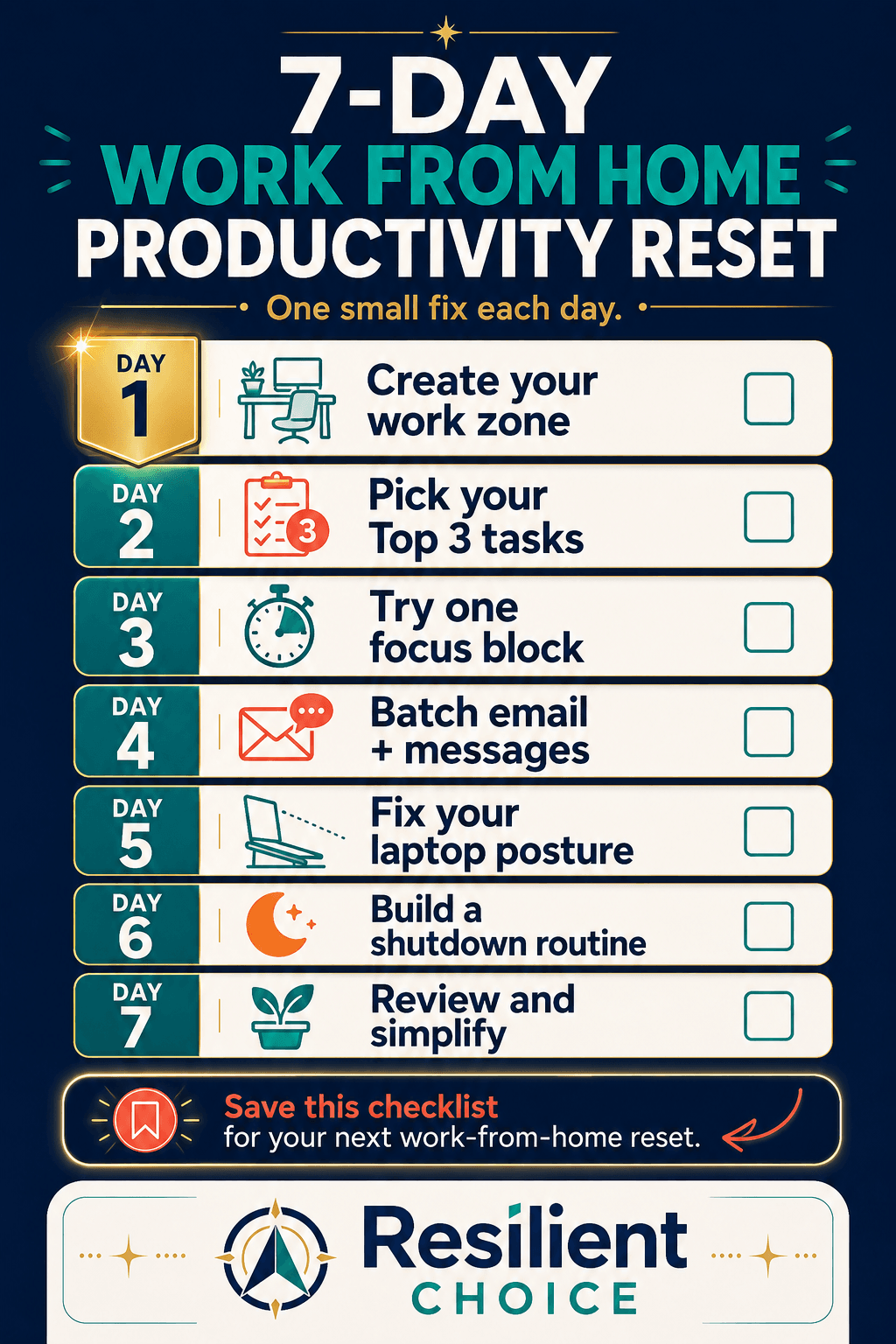
Do not try to fix everything in one day. Use this 7-day reset to improve one part of your work-from-home system each day.
| Day | Action | Why it helps |
|---|---|---|
| Day 1 | Create your work zone | Gives your brain a consistent place for work mode. |
| Day 2 | Pick your top 3 tasks | Reduces overwhelm and makes the day measurable. |
| Day 3 | Try one focus block | Builds attention without forcing an unrealistic schedule. |
| Day 4 | Batch email and messages | Reduces constant context switching. |
| Day 5 | Fix your laptop posture | Makes your desk setup more comfortable for longer sessions. |
| Day 6 | Build a shutdown routine | Creates closure and helps personal time feel separate. |
| Day 7 | Review and simplify | Keeps only the habits that actually helped. |
Common Work-From-Home Productivity Mistakes
These mistakes are common because they feel harmless in the moment. Fixing even two or three can make your day feel much more controlled.
| Mistake | Why it hurts focus | Better approach |
|---|---|---|
| Working from bed | Blurs sleep and work boundaries. | Create even a small work zone. |
| Checking email first | Starts the day reactively. | Review your top 3 tasks first. |
| Keeping all notifications on | Destroys deep work. | Use focus mode and batch messages. |
| Using a huge to-do list | Creates overwhelm. | Choose three daily outcomes. |
| Working without breaks | Leads to fatigue and poor attention. | Use planned breaks or Pomodoro sessions. |
| No shutdown routine | Makes work feel endless. | Close tabs, write tomorrow’s plan, and step away. |
FAQ: Work From Home Productivity for Beginners
How do I stay productive working from home as a beginner?
Start with a simple system: choose your top 3 tasks, create one focus block, batch messages, and use a shutdown routine. Do not begin by downloading many productivity apps. Build the routine first, then add tools.
What is the best daily routine for working from home?
A good beginner routine includes a short virtual commute, a top 3 task list, one focused work block, planned communication windows, breaks, and an evening shutdown routine. The exact timing can change based on your job, but the structure should stay consistent.
How do I avoid distractions while working from home?
Use the one-tab rule, turn off non-essential notifications, batch email and chat, keep a distraction list beside your keyboard, and create a physical work zone. Reducing distractions is easier when your environment supports focus.
What is a virtual commute?
A virtual commute is a short routine that creates a mental bridge between personal time and work mode. It may include walking, stretching, making coffee, reviewing your calendar, or writing your top 3 tasks before starting work.
What is the difference between time blocking and timeboxing?
Time blocking tells you when a task will happen on your calendar. Timeboxing limits how long you will spend on that task. Time blocking protects time; timeboxing protects you from overthinking or perfectionism.
Is Pomodoro good for remote workers?
Pomodoro can be useful for remote workers who struggle to start tasks or stay focused. A common version uses 25 minutes of work followed by a short break. It may not be ideal for every deep creative task, so adjust it to your work style.
How do I separate work and personal life in a small apartment?
Use visual boundaries. Choose one work corner, use a laptop stand or small desk, keep work items in one box or cart, and close or cover the laptop when the workday ends. A small space can still have a clear routine.
What tools should beginners use for work-from-home productivity?
Start with one calendar, one task list, one focus timer, and one place to capture notes. Google Calendar, Todoist, Microsoft To Do, Forest, or a simple notebook can be enough. Add AI or automation tools only after your basic routine is working.
Sources and further reading:
This guide references research and guidance from Cornell ILR School on work-from-home boundaries, Harvard Business School Working Knowledge on commuting and role transitions, Mayo Clinic on office ergonomics, the official Pomodoro Technique website, Owl Labs’ 2025 hybrid work report, and Australia’s Fair Work Ombudsman right-to-disconnect guidance.
Cornell ILR School research • Harvard Business School Working Knowledge • Mayo Clinic ergonomics guide • Pomodoro Technique • Owl Labs 2025 State of Hybrid Work • Fair Work Ombudsman
Final Takeaway
Working from home becomes easier when you stop relying only on motivation. Motivation changes every day. A simple system gives you something to follow even when your energy is low.
Start with your top three tasks, protect one focus block, reduce distractions, improve your work setup, and create a shutdown routine. You do not need to fix everything today. Make one small change, repeat it tomorrow, and let the system become normal.