
Best AI Tools for Online Business Beginners
A practical beginner guide to choosing a small AI tool stack for writing, research, design, organization, and automation without tool overload.
Then Scale
Starting an online business is exciting, but choosing the right tools can quickly become confusing.
This guide focuses on AI tools for online business beginners who want practical help without tool overload.
One article says you need 25 AI tools. Another gives you 50. Then you see tools for writing, design, automation, video, email, customer service, SEO, analytics, and almost everything else. It can feel like you are already behind before you have even started.
For a beginner, that creates a real problem: tool overload.
You do not need 50 AI tools to start an online business. You need a small, practical AI stack that helps with the work you are actually doing right now.
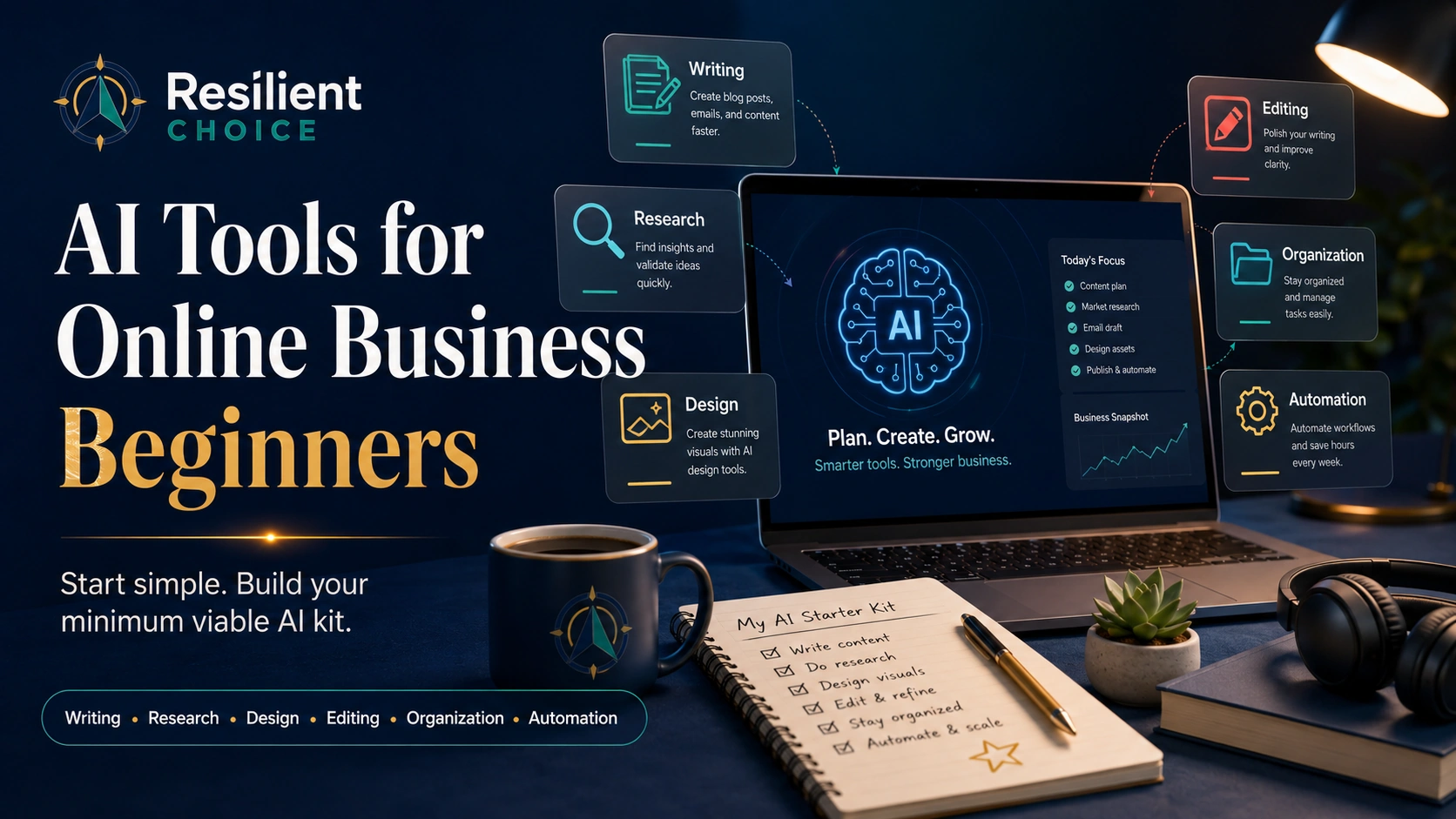
This guide will help you choose a useful “Minimum Viable AI Kit” for writing, research, design, editing, organization, and simple automation. The goal is not to collect apps. The goal is to build a workflow you can actually use every week.
AI tools can support your work, but they do not guarantee traffic, income, ranking, sales, or business success. Your results still depend on your niche, offer, skills, consistency, audience, and execution.
Ready to turn your AI content into a real lead system?
After choosing your AI tools, the next step is building a simple landing page, email list, and test funnel. Our Systeme.io review explains whether the free plan is enough before you pay for separate tools.
Read the Systeme.io Review for Beginners
Helpful for landing pages, funnels, email capture, and digital product testing.
Some links on Resilient Choice may be affiliate links. If you click and make a purchase, we may earn a commission at no extra cost to you. Our goal is to help readers compare tools with clarity, not pressure. You can read our affiliate disclosure for more details.
Quick Answer: Best AI Tools for Online Business Beginners
If you are just starting, focus on tools that solve basic online business tasks first. Do not start with the most advanced tool. Start with the tool that removes the biggest bottleneck in your current work.
| Business Need | Beginner Tool Type | Example Tools |
|---|---|---|
| Writing and planning | AI assistant | ChatGPT, Claude, Gemini |
| Research | AI research assistant | Perplexity |
| Design | AI design tool | Canva |
| Editing | Writing improvement tool | Grammarly |
| Organization | AI workspace | Notion AI |
| Automation | No-code automation | Zapier, Make |
| Video and content repurposing | AI editing tool | Descript, CapCut |
A beginner should not start by buying every tool on this list. Start with one writing tool, one research tool, one design tool, and one place to organize your work. Add automation only when you clearly understand your workflow.
You can explore more beginner-friendly guides in our AI tools section.
The Minimum Viable AI Kit: Start Small Before You Scale
The biggest mistake beginners make is trying to automate everything too early.
They buy writing tools, SEO tools, image tools, video tools, chatbot tools, email tools, and automation tools before they have a clear business process. The result is usually not growth. It is confusion.
The Minimum Viable AI Kit
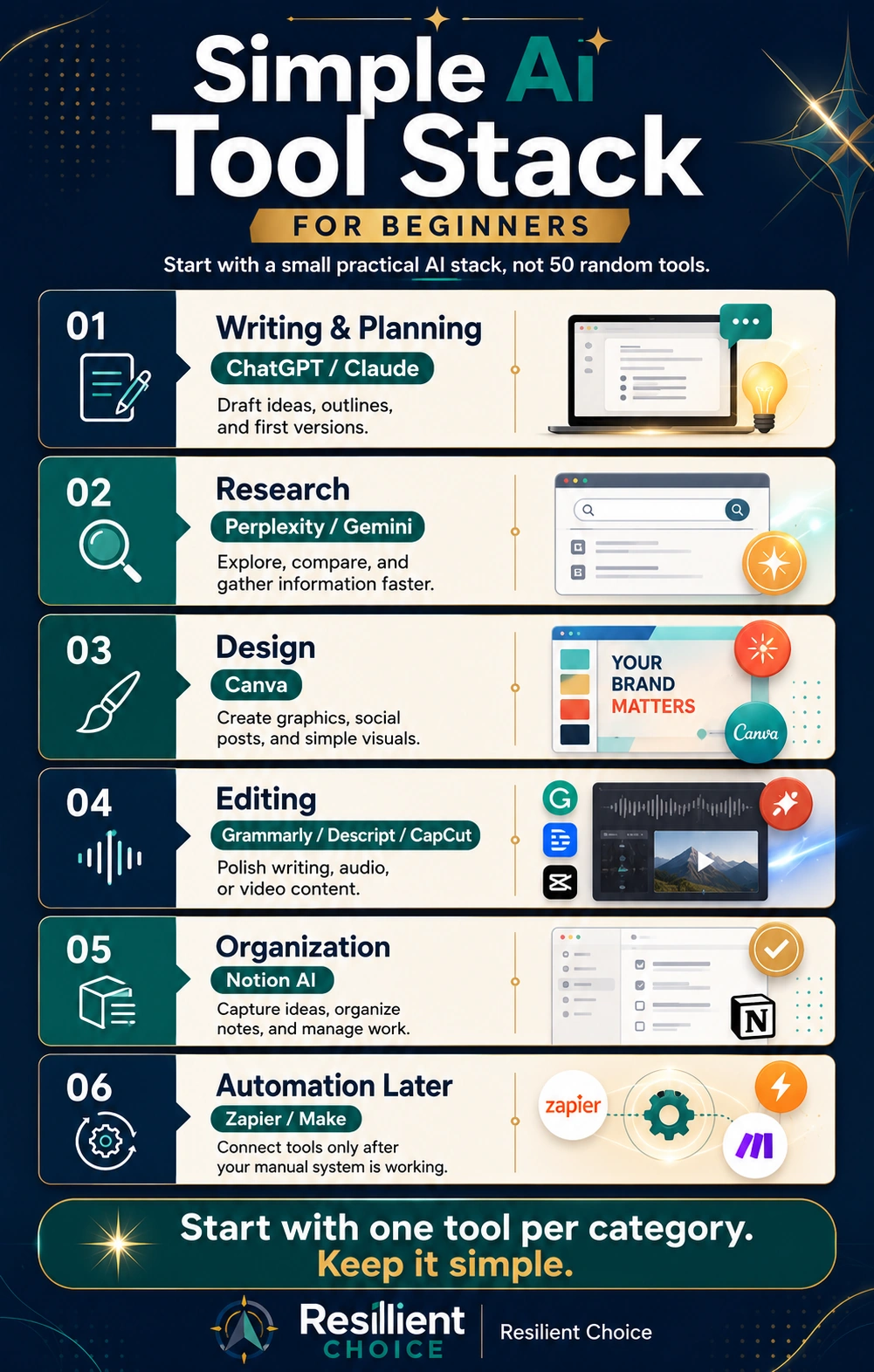
A Minimum Viable AI Kit means starting with the smallest useful set of tools that helps you complete real business tasks.
- One AI assistant for writing, planning, and brainstorming
- One research tool for finding sources and understanding topics
- One design tool for blog graphics, Pinterest pins, and social posts
- One editing tool for clarity, grammar, and tone
- One workspace for organizing ideas and content plans
- One automation tool later when your workflow is clear
The goal is not to collect tools. The goal is to create a simple workflow you can actually use every week.
Simple AI Tool Stack for Beginners
How We Chose These AI Tools
This guide is not based on hype or trending tool names. We selected tools using practical beginner-focused criteria.
| Criteria | Why It Matters |
|---|---|
| Beginner-friendly | A beginner should be able to understand the tool without technical training. |
| Useful for real tasks | The tool should help with writing, research, design, planning, editing, automation, or content. |
| Works for online business | The tool should support common digital business workflows. |
| Low-friction starting point | Free plans, trials, or low-cost entry options are useful for beginners. |
| Clear limitations | A trustworthy guide should explain what a tool cannot do. |
| Human review still required | AI should support decisions, not replace judgment. |
For more about our editorial process, read how we review tools and products.
Before You Choose Any AI Tool, Ask These 5 Questions
Before paying for an AI tool, ask yourself these questions. They will save you from buying tools that look useful but never become part of your real work.
| Question | Why It Matters |
|---|---|
| What repeated task will this tool improve? | Prevents random tool buying. |
| Will I use it every week? | Helps you avoid paying for tools you rarely open. |
| Does it fit my current workflow? | A tool should reduce friction, not create more work. |
| Can I test it before paying annually? | Reduces risk. |
| Does it improve time, quality, or consistency? | Helps you judge real value. |
A good AI tool should solve a repeated bottleneck. Do not choose a tool only because it is popular. Choose it because it solves a specific problem in your workflow.
Best AI Tools for Online Business Beginners: Comparison Table
The table below compares AI tools for online business beginners by use case, difficulty, and starting point.
| Tool | Best For | Beginner Difficulty | Free Option | Best Use Case |
|---|---|---|---|---|
| ChatGPT | Writing, planning, brainstorming | Easy | Yes | Drafting, outlines, ideas |
| Claude | Long-form writing and editing | Easy-Medium | Yes / limited | Thoughtful drafts and editing |
| Gemini | General AI help and Google-style workflows | Easy | Yes | Research, writing, planning |
| Perplexity | Research with sources | Easy | Yes | Topic research and source discovery |
| Canva | Visual design | Easy | Yes | Blog images, pins, graphics |
| Grammarly | Editing and clarity | Easy | Yes | Grammar, tone, readability |
| Notion AI | Notes, planning, organization | Medium | Limited | Content calendars and knowledge base |
| Zapier | Simple automation | Medium | Limited | Connecting apps without coding |
| Make | Visual automation | Medium | Limited | Flexible workflows |
| Descript | Video/audio editing | Medium | Limited | Editing podcasts, videos, and clips |
| CapCut | Short-form video editing | Easy-Medium | Yes / limited | Reels, shorts, and social videos |
Pricing, free plans, and features can change. Always verify details on the official tool website before paying.
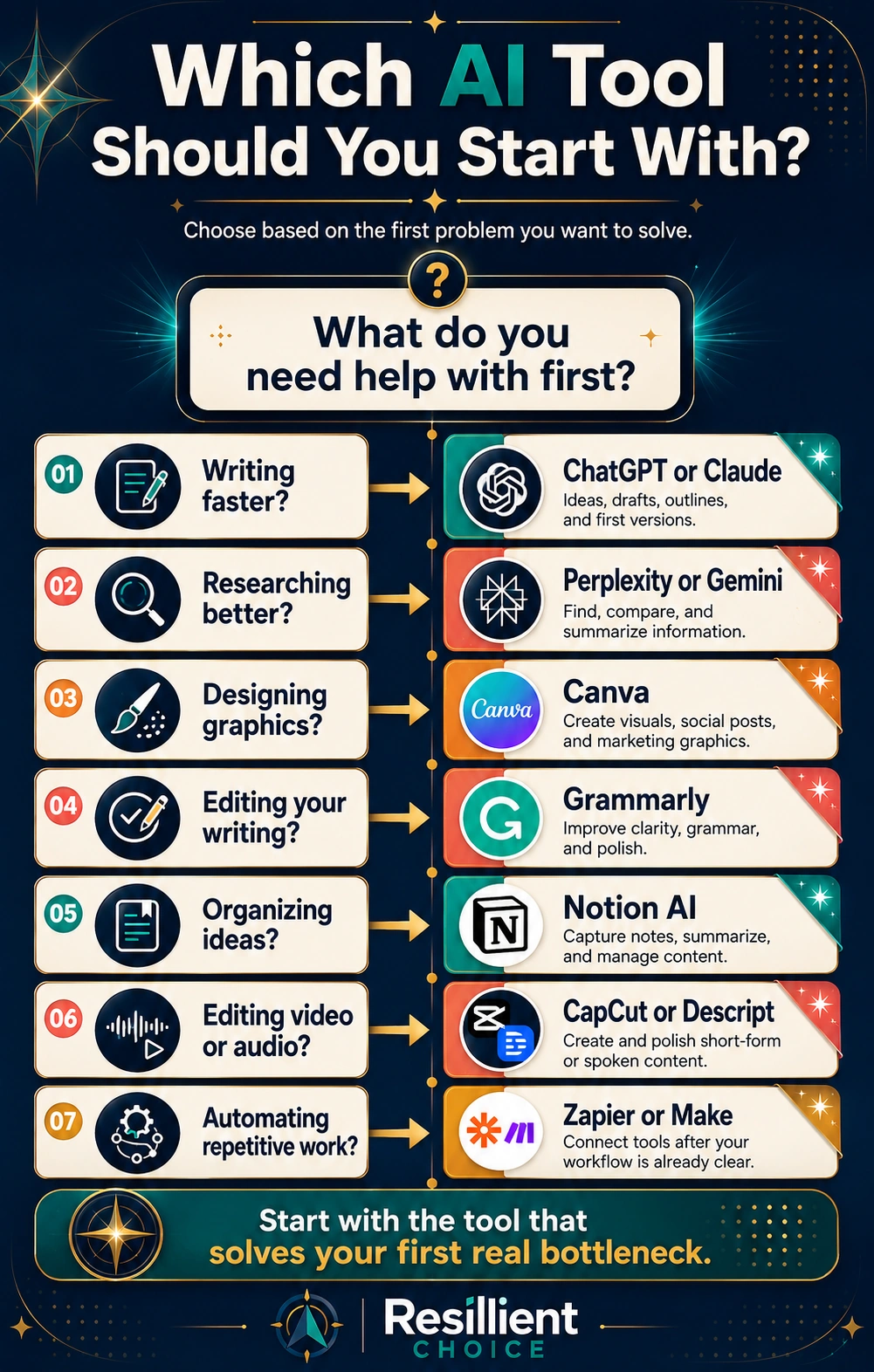
Which AI Tool Should You Start With?
Start with the tool that solves your most frequent problem.
Best AI Writing and Planning Tools
Writing is one of the first bottlenecks for online business beginners.
You may need blog posts, emails, captions, landing page copy, product descriptions, video scripts, outlines, and customer messages. AI writing assistants can help you get a first draft faster.
But they should not replace your judgment. AI writing tools are best used for brainstorming, outlining, drafting, rewriting, summarizing, and planning. They are not best used for publishing unedited content.
Google says AI can be useful, but content should still provide real value to users and avoid scaled, low-value publishing. Read Google’s guidance on AI-assisted content.
ChatGPT
ChatGPT is one of the most useful starting points for beginners because it can help with writing, brainstorming, rewriting, summarizing, and planning. OpenAI describes ChatGPT as useful for answering questions, explaining concepts, drafting, rewriting, summarizing content, and offering creative support. according to OpenAI.
Blog outlines, email drafts, social captions, offer ideas, checklists, and content planning.
Ask it to turn rough ideas into a clear outline before writing the full draft.
It can sound generic and may need fact-checking, editing, and stronger examples.
Claude
Claude is another strong AI assistant, especially for long-form writing, editing, summarizing, and document-style work. Anthropic describes Claude as an AI assistant built to help users do their best work. according to Claude.
Long-form drafts, editing, rewriting, summarizing, and structured explanations.
Use it to make a rough article clearer, calmer, and more reader-friendly.
Polished writing still needs human review, verification, and brand alignment.
Google Gemini
Gemini is useful for people who already use Google products or want a general AI assistant for writing, planning, brainstorming, and everyday tasks. Google describes Gemini as an AI assistant that can help with writing, planning, brainstorming, and more. according to Google Gemini.
Brainstorming, drafting, research support, planning, and Google-style productivity workflows.
Create a weekly content plan or organize research into clear topic sections.
Output still needs checking before publishing or using in business decisions.
Best AI Research Tool
Many beginners try to write content before they understand the topic. That is one reason AI-generated content often feels shallow.
Before writing, you need research. You need to know what people are asking, what competitors are saying, what facts need verification, and where your article can add something useful.
Perplexity
Perplexity is useful because it positions itself as an AI-powered answer engine that provides answers with sources. according to Perplexity.
Topic research, source discovery, competitor research, and understanding common questions.
Use it before writing to understand the topic and collect sources to verify.
Source quality still matters. Always check whether a source is reliable and current.
Best AI Design Tool
Online business content needs visuals. Even a useful article can feel boring if it has no featured image, graphics, or skimmable visual sections.
Canva
Canva is one of the most beginner-friendly design tools for online business owners. Canva offers Magic Design and other AI-supported design features for creating templates and visual assets. according to Canva.
Blog featured images, Pinterest pins, social graphics, simple infographics, and thumbnails.
Create one featured image and one Pinterest pin for every article you publish.
Templates can look generic if you do not customize colors, spacing, and brand style.
For Resilient Choice-style content, avoid loud money graphics, luxury visuals, fake income images, and aggressive sales-style designs.
Best AI Editing Tool
Writing is not finished after the first draft. Good editing improves clarity, trust, and reader experience.
Grammarly
Grammarly is useful for improving grammar, clarity, tone, and readability. Grammarly describes its AI writing assistant as a tool that can help with ideas and outlines for emails, reports, articles, and more. according to Grammarly.
Grammar checks, spelling checks, tone improvement, email writing, and blog editing.
Run your draft through Grammarly after writing to check clarity and sentence flow.
Do not accept every suggestion blindly. Final voice and judgment should stay with you.
Best AI Productivity and Organization Tool
Many beginners lose time because their ideas are scattered. They save prompts in one place, links in another, content ideas somewhere else, and tasks in a separate app.
Notion AI
Notion is useful for organizing notes, tasks, projects, databases, and content plans. Notion describes its AI tools as helping users discover answers, bring information together, and automate tedious tasks. according to Notion.
Content calendars, business notes, research databases, task planning, and project organization.
Create one simple dashboard for article ideas, drafts, published posts, and pin ideas.
Notion has a learning curve. Start with a simple page or table, not a complex system.
You can also explore our productivity systems section for more practical workflow ideas.
Need a simple place to collect emails and test an offer?
AI tools can help you write and design faster, but you still need a practical system for landing pages, email capture, and offer testing.
See the Systeme.io Free Plan Review
Use this before buying separate funnel, email, and course tools.
Best AI Automation Tools for Beginners
Automation can save time, but only when you automate the right task.
A common beginner mistake is trying to automate everything before understanding the workflow. This creates frustration.
Do not automate everything on day one. Automate only repeated tasks you already understand.
Zapier
Zapier is beginner-friendly for connecting apps without coding. Zapier says it connects AI tools to thousands of everyday apps and helps users build AI workflows and agents. according to Zapier.
Form-to-email workflows, lead notifications, simple task automation, and app connections.
When a contact form is submitted, add the lead to a sheet and send yourself an alert.
It is easy to start with, but costs can increase as task volume grows.
Make
Make is a visual automation platform that allows users to build and scale workflows. Make describes itself as a no-code integration tool for visually building and automating AI workflows. according to Make.
Visual workflows, multi-step processes, flexible automation, and more control.
Use it after you understand your process and want more flexible workflow logic.
Make can feel more technical than Zapier at first.
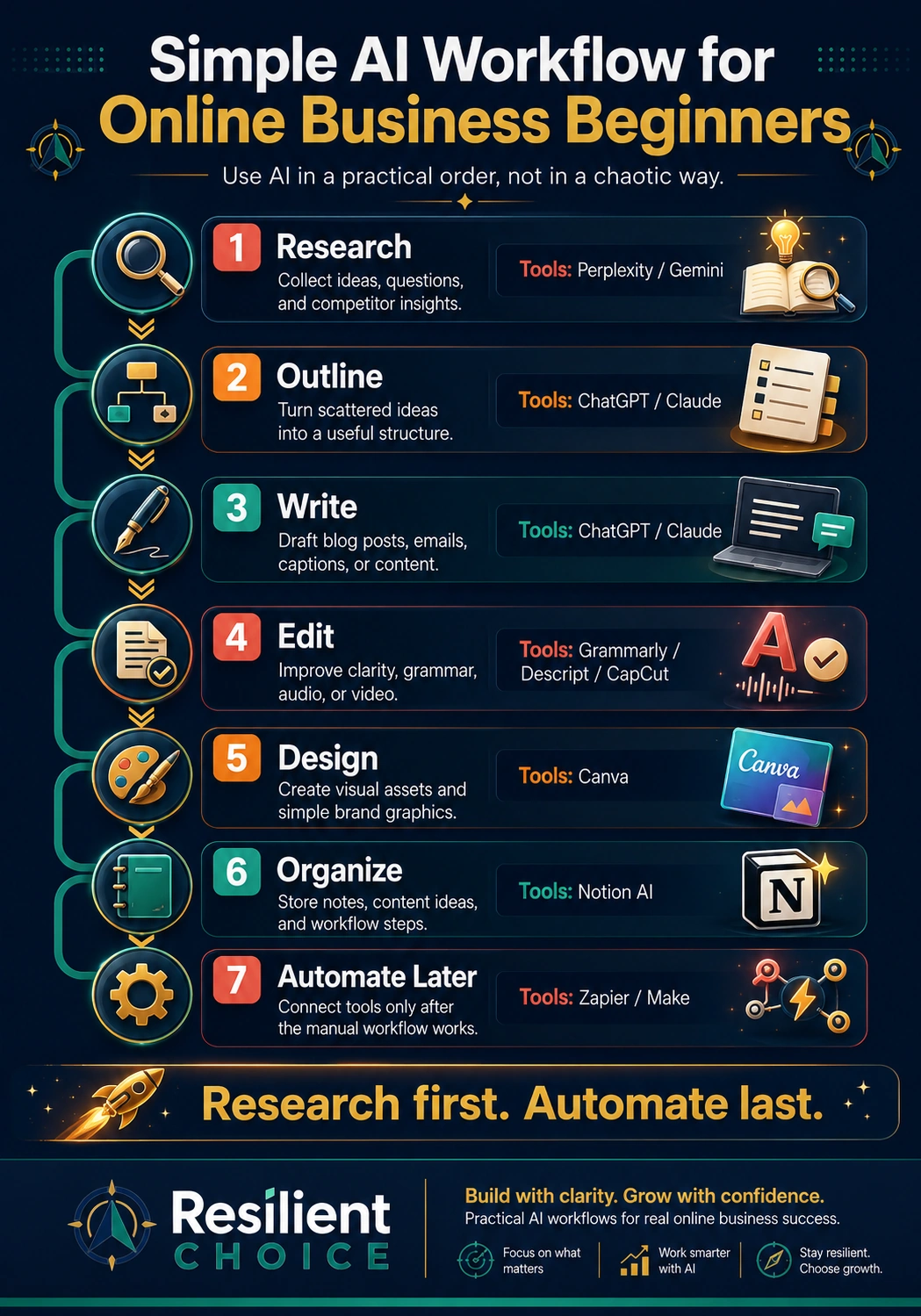
Simple AI Workflow for Online Business Beginners
Best AI Video and Content Repurposing Tools
Video is useful for online business, but it can take time to edit. AI video tools can help with transcripts, clips, captions, and repurposing content.
Descript
Descript is useful for editing video and audio with a text-based workflow. Descript describes its platform as a tool where users can record, transcribe, edit, and publish video and audio. according to Descript.
Podcast editing, video editing, transcripts, captions, clips, and repurposing content.
Record a video, transcribe it, cut unnecessary parts, and create short clips.
It does not replace strong ideas, clear scripting, or a good content strategy.
CapCut
CapCut is popular among short-form video creators. CapCut’s AI video tools can support editing tasks such as templates, AI-assisted editing, and visual improvements. according to CapCut.
Reels, Shorts, TikTok-style videos, captions, quick edits, and social media formatting.
Create short videos from simple scripts or repurpose longer videos into social clips.
Check current terms, privacy policies, and commercial-use rules before using it for business content.
Free vs Paid AI Tools: What Should Beginners Choose?
Most beginners should start with free plans or monthly plans. Do not pay annually until you know a tool is useful in your weekly workflow.
| Situation | Stay Free | Consider Paid |
|---|---|---|
| You are learning basics | Yes | Not needed yet |
| You publish occasionally | Yes | Maybe later |
| You publish every week | Maybe | Consider upgrading |
| You work with clients | Maybe | Often useful |
| You need brand consistency | Maybe | Useful for design/workflow tools |
| You automate many tasks | Usually no | Paid plan may be needed |
| You need team features | Usually no | Consider paid |
A paid AI tool is worth considering only if it helps you save time every week, improve content quality, reduce repeated manual work, improve customer experience, organize your work better, or support real business activity.
Do not upgrade because of fear of missing out. Upgrade because the tool has earned its place in your workflow.
7-Day AI Tool Test Before You Pay
Before paying for an AI tool, test it for one week. Use it on real work, not just random experiments.
| Day | What to Test |
|---|---|
| Day 1 | Choose one task you want to improve. |
| Day 2 | Use the tool on a real business task. |
| Day 3 | Check if it saves time. |
| Day 4 | Check if the output quality is good enough. |
| Day 5 | Check if the tool is easy to use. |
| Day 6 | Compare it with your current process. |
| Day 7 | Decide whether it is worth paying for. |
If the tool does not save time, improve quality, reduce confusion, or fit your workflow, do not upgrade yet.
Common Mistakes Beginners Make With AI Tools
1. Buying Too Many Tools Too Early
More tools do not automatically mean more progress. Too many tools can create more logins, more dashboards, more tutorials, more confusion, and more monthly costs.
2. Automating Before Understanding the Workflow
Automation works best when you already understand the task. If your workflow is messy, automation may only make the mess faster.
3. Publishing Raw AI Content
AI can help create drafts, but publishing raw AI content is risky. It can be generic, inaccurate, repetitive, or unhelpful. Google’s spam policies warn against large amounts of unoriginal content created mainly to manipulate rankings, regardless of how it is produced. Read Google’s spam policies.
4. Ignoring Privacy and Data Safety
Do not paste sensitive data into AI tools without understanding how the tool handles data.
5. Choosing Tools Because They Are Trending
A tool can be popular and still not be right for you. The better question is: what repeated task does this tool help me complete better?
6. Paying Annually Too Early
Annual plans can save money later, but they are risky at the beginning. Start with a free plan or monthly plan. Use the tool for real work. Upgrade only after it proves useful.
Do not buy an AI tool just because it is trending. A tool is useful only if it helps with a repeated task, saves time, improves quality, or makes your workflow easier.
Privacy and Human Review: What Beginners Should Know
Do not paste private customer data, passwords, financial details, confidential documents, or sensitive business information into AI tools unless you understand the tool’s privacy settings and terms.
AI tools can support your online business, but human review is still important.
Use AI for drafts, summaries, brainstorming, research support, planning, organization, and repetitive tasks.
Keep human review for final published content, customer-facing messages, legal, medical, financial, or sensitive topics, brand voice, product claims, pricing decisions, and business strategy.
A simple rule: let AI assist the work. Do not let AI silently control important decisions.
For more context, read our disclaimer.
Recommended Beginner AI Stacks by Goal
| Beginner Goal | Recommended Stack |
|---|---|
| Start a blog | ChatGPT or Claude + Perplexity + Grammarly + Canva |
| Start affiliate marketing | Perplexity + ChatGPT + Canva + Notion AI |
| Create Pinterest content | ChatGPT + Canva + manual Pinterest research |
| Build a service business | ChatGPT + Notion AI + Zapier + HubSpot |
| Create video content | ChatGPT + Descript or CapCut + Canva |
| Stay organized | Notion AI + Grammarly + Google Calendar |
| Build simple automations | Zapier first, Make later |
This does not mean you need every tool immediately. Pick the stack that matches your current goal.
Optional Tools to Add Later
Some tools are useful, but not necessary on day one.
| Tool Type | Example Tools | Add Later When |
|---|---|---|
| SEO content tools | Frase, Surfer SEO | You publish content consistently. |
| CRM and marketing tools | HubSpot | You receive leads regularly. |
| Customer support tools | Tidio | You get repeated customer questions. |
| Advanced automation | Make, n8n | You understand your workflow. |
| Video tools | Descript, CapCut | You publish video regularly. |
Start With a Small AI Stack
The best AI tools for online business beginners are not always the most advanced tools. They are the tools that help you complete real work with less confusion.
A practical beginner stack may include ChatGPT, Claude, or Gemini for writing and planning; Perplexity for research; Canva for visuals; Grammarly for editing; Notion AI for organization; and Zapier or Make for automation later.
Choose fewer tools, use them better, and build a workflow you can actually maintain.
To continue learning, explore our guides on AI tools, online business resources, and productivity systems.
FAQ: AI Tools for Online Business Beginners
What are the best AI tools for online business beginners?
The best AI tools for online business beginners are tools that help with writing, research, design, editing, organization, and simple automation. A practical beginner stack may include ChatGPT or Claude, Perplexity, Canva, Grammarly, Notion AI, and Zapier.
What is the Minimum Viable AI Kit?
The Minimum Viable AI Kit is the smallest useful set of AI tools a beginner needs to support real business tasks. It usually includes one AI assistant, one research tool, one design tool, one editing tool, one organization tool, and one automation tool later.
How many AI tools should a beginner start with?
Most beginners should start with two to four tools. Starting with too many tools can create confusion and unnecessary costs.
Should beginners use free or paid AI tools?
Beginners should usually start with free or low-cost plans. Upgrade only when a tool saves time, improves quality, supports client work, or becomes part of your weekly workflow.
Can AI tools help me make money online?
AI tools can support online business tasks such as content creation, research, design, planning, and automation. However, they do not guarantee income, sales, traffic, or success.
Can AI replace human work?
AI can assist with repetitive tasks, drafts, summaries, and planning, but it should not replace human judgment. You still need to verify facts, understand your audience, edit content, and make business decisions.
What is the biggest mistake beginners make with AI tools?
The biggest mistake is choosing tools because they are trending instead of choosing tools that solve a specific workflow problem.
Are AI tools safe for business data?
AI tools can be useful, but beginners should be careful with private or sensitive data. Do not upload customer information, passwords, financial records, client documents, or confidential business details unless you understand the tool’s privacy settings and terms.
Which AI tool is best for blog writing?
ChatGPT, Claude, and Gemini can all help with blog writing. They are useful for outlines, drafts, rewrites, and idea generation. Final blog content should still be edited, fact-checked, and improved by a human before publishing.
Which AI tool is best for research?
Perplexity is useful for research because it helps users explore topics and find source-backed answers. Users should still review source quality before relying on the information.
Which AI tool is best for Pinterest graphics?
Canva is one of the easiest tools for creating Pinterest graphics, blog images, and simple infographics. Beginners should use clear text, readable layouts, and helpful article-focused designs instead of hype-based visuals.
Should I use Zapier or Make as a beginner?
Zapier is usually easier for beginners who want simple app connections. Make can be more flexible and visual, but it may have a steeper learning curve.
Resilient Choice publishes educational and informational content only. Our guides are designed to help readers understand tools, resources, and decision options more clearly. Content on this website should not be treated as financial, medical, legal, psychological, or professional advice. Please read our disclaimer before making important decisions.